I was following an AWS Solutions Architect Associate course by Stephane Maarek. The lesson showed how to create an IAM user, add it to a group and sign in to the AWS console as that user. My console looked different. Under Identity and Access Management (IAM), I saw Roles, Policies, IAM users and Root access management—but no User groups menu.
At first I thought I was simply missing a button. The real lesson was that AWS has more than one account experience. The newer project-based AWS experience has different access-management rules, not just a redesigned interface. These are my notes from a working lab on 25 November 2026; AWS can change its screens again.
1. The difference between older course instructions and my account
| In the traditional IAM course lab | In the new AWS project experience I used |
|---|---|
| Create a console IAM user | IAM users are for specific programmatic use cases; new console IAM-user sign-in is unavailable |
| Add the user to an IAM group | The traditional User groups option was not present in my console |
| Log in to the console as the IAM user | Use an AWS Builder ID and the Team page for human project access |
| Open IAM Policy Simulator | The simulator showed Feature unavailable and required advanced features |
| Protect the IAM-user login with MFA | Configure Builder ID MFA separately; this does not configure IAM-user MFA |
This does not mean IAM groups have disappeared from AWS in general. It means an older course workflow need not map one-to-one to a particular account type. AWS documentation explicitly says the new experience does not allow IAM users with console access.
2. Two kinds of identity: human and programmatic
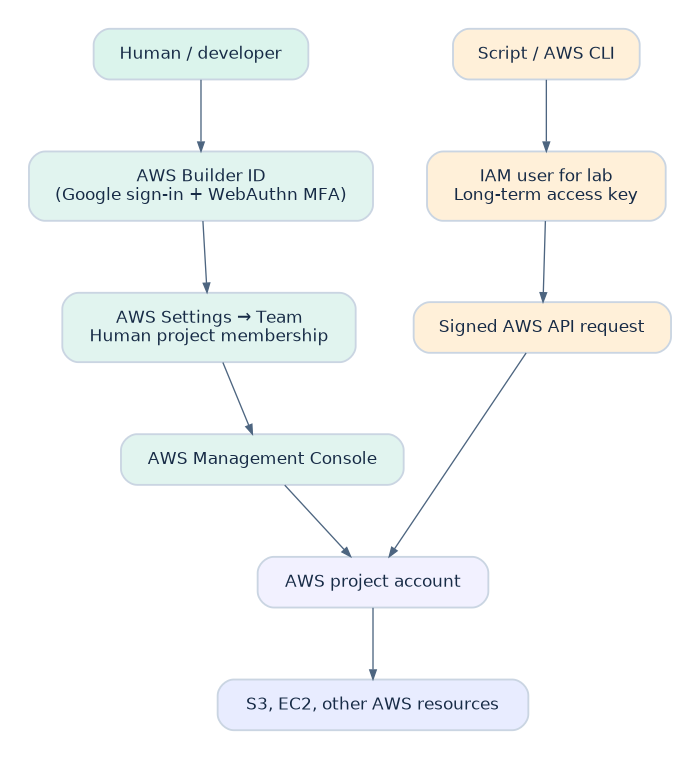
For people: I signed in with an AWS Builder ID using Google. AWS Settings offered Projects and Team, where the owner can invite trusted collaborators. The invitation screen described broad developer access to selected projects. Team membership is not the same thing as membership of an IAM user group.
For scripts or workloads: I created a separate IAM user for a command-line experiment. An IAM user can authenticate API requests with an access key, subject to the permissions policies that apply to it. For routine modern workloads, AWS generally prefers temporary credentials and IAM roles over permanent access keys.
One useful distinction: authentication proves the identity making a request; authorization determines what that identity may do. A successfully authenticated user can still receive AccessDenied.
3. Register MFA for the AWS Builder ID
The first security step was for the human sign-in, not the CLI user:
- Open AWS Builder ID Profile, then Security.
- Add a recovery email if required.
- In Multi-factor authentication (MFA) devices, choose Register device.
- Follow the browser prompts to register a passkey/security key or an authenticator device.
- Return to the Security page and verify that the device is listed.
In my lab, the registered device type was WebAuthn. WebAuthn can use a security key or a compatible passkey mechanism. It is different from a six-digit time-based authenticator code.
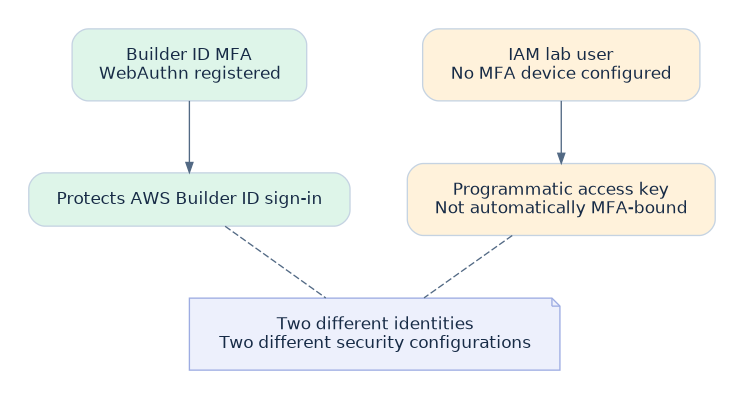
Important: MFA registered on my AWS Builder ID did not automatically add MFA to the IAM user. Likewise, naming an IAM user with the word mfa does not enable MFA. At the end of this exercise, IAM-user MFA was not configured; it remains a separate lab.
4. IAM policy experiment: least privilege
For learning purposes, I created a programmatic IAM user (called s3-readonly-lab in this public example). Initially I attached AdministratorAccess directly, then removed it after recognising how broad it was. I replaced it with the AWS-managed policy AmazonS3ReadOnlyAccess.
A read-only S3 policy is safer than AdministratorAccess, but it can still grant broad visibility into S3 data. Use a dedicated test account and restrict resources further when needed.
Since group management was unavailable in my console, the policy was attached directly to the IAM user rather than inherited from a group. The console showed the policy under the user’s Permissions tab with Attached via: Directly.
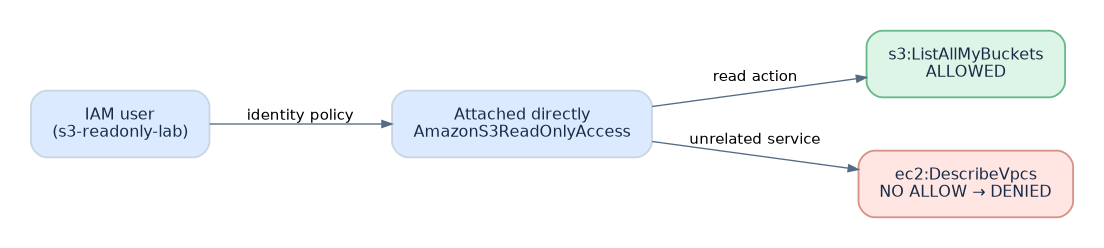
With IAM, an identity-based policy normally needs an explicit Allow for an action. If no applicable allow is present, the request is implicitly denied. An explicit Deny takes precedence over an Allow. Other account controls can also restrict access.
5. Testing permissions without the Policy Simulator
I selected Simulate, but the console returned Feature unavailable — activate advanced features. Rather than change the account, I used the AWS CLI to check actual API behaviour.
# Identity: confirmed successfully in the lab
aws sts get-caller-identity --profile lab-s3

# Read-only S3 call: confirmed successfully in the lab
aws s3api list-buckets --profile lab-s3

# Optional negative test: not performed in this lab session
# Expected to be denied without an EC2 allow policy
aws ec2 describe-vpcs --region ap-southeast-2 --profile lab-s3
The S3 response included "Buckets": []. This means the caller was allowed to list buckets, but the account had none; it is not a failure. AmazonS3ReadOnlyAccess supports that read operation. The EC2 example above is a suggested follow-up test, not a result I verified.
These tests are useful, but they do not substitute for systematically auditing policies. A successful read test proves only that the particular API request succeeded in that environment.
6. Should I activate advanced features just to follow a video?
I chose not to. Advanced AWS features open up more controls, but AWS documents that activation cannot be reversed. It also changes account management and removes spending limits if present. A beginner lab is not a good reason to make an irreversible account change merely to reproduce an older screen.
Before enabling anything, check AWS’s up-to-date access-management and billing documentation and assess whether the extra capabilities are truly needed.
7. Notes for the SAA-C03 exam
| Term | Short meaning |
|---|---|
| Principal | Identity making an AWS request |
| IAM policy | JSON permissions controlling actions and resources |
| IAM user | Long-lived IAM identity, increasingly reserved for specific programmatic cases |
| IAM role | Identity commonly assumed to get temporary credentials |
| AWS Builder ID | Human identity used for the new AWS experience |
| Team | Human collaboration access to AWS projects, not an IAM user group |
| MFA | Second-factor protection; configured per relevant identity/access method |
| Least privilege | Give only the permissions needed for the task |
What is complete? Builder ID MFA, the IAM lab user, a directly attached read-only S3 policy and a successful S3 listing. What is not complete? IAM-user MFA, an IAM group-based lab and the EC2 denial test.
The companion post, AWS CLI on RHEL 10 WSL2 and Windows PowerShell, documents every command and the troubleshooting that got the CLI working.
References
- AWS: Compare sign-up options and access management
- AWS: Create an IAM user
- AWS: Manage Builder ID MFA
- AWS: AmazonS3ReadOnlyAccess managed policy
- AWS: Activate advanced features
Security/publication note: All account IDs, real access-key IDs, personal email addresses and registration identifiers are intentionally omitted. Commands use public lab placeholders.