When I press the power button, how does the machine move from a hardware self-test to running the first Linux process?
That was the question behind my original Tune2Wizard note on the Linux boot sequence. I was interested in what happens before the shell appears: the BIOS, the disk’s Master Boot Record, the bootloader, the Linux kernel, and finally init.
Archive note: Originally published on Tune2Wizard on 11 August 2013. This post explains the classic BIOS + MBR + GRUB + SysV init sequence described in that article. Modern UEFI and systemd systems commonly use a different boot flow, so I have marked those distinctions rather than silently presenting the legacy flow as universal.
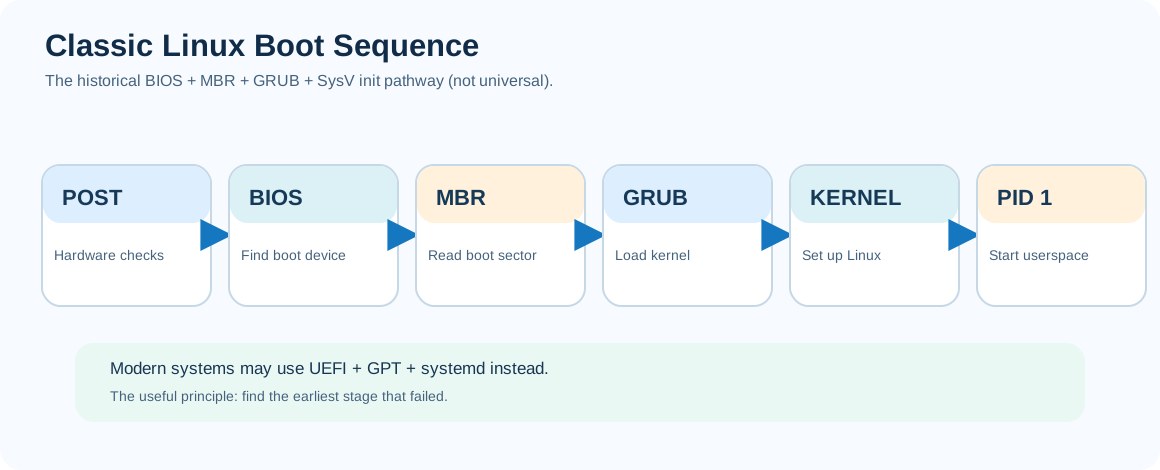
What happens before Linux runs?
My original notes broke the process into a sequence:
- POST — Power-On Self-Test: Firmware checks and initialises hardware.
- BIOS: On a traditional BIOS machine, firmware selects a bootable device and transfers control to its boot code.
- MBR — Master Boot Record: In the classic partitioned-disk scheme, the first sector is 512 bytes and includes boot code, a partition table and a boot signature.
- GRUB: A bootloader locates the Linux kernel and an initial RAM image.
- Kernel and initial root filesystem: Linux starts, initialises drivers and mounts or transitions to the root filesystem.
- PID 1: The kernel runs the first userspace process, which brings up the rest of the system.
The MBR layout I described was:
| Bytes | Classic MBR role |
|---|---|
| First 446 | Bootstrap code area |
| Next 64 | Four partition table entries |
| Last 2 | Boot signature 0x55AA |
One correction to the original wording: those final two bytes are a signature, not a checksum. The MBR format is also specific to legacy BIOS/MBR boot, not every modern Linux installation.
Why does a bootloader matter?
The firmware does not ordinarily understand how to locate and run every possible Linux kernel and filesystem configuration. The bootloader bridges that gap.
In the original note I used GRUB — Grand Unified Bootloader as the example. Its job is to select and load a kernel, pass boot arguments, and load an initial RAM image if required.
That initial image provides early userspace and drivers needed to find or prepare the real root filesystem. The original article called it initrd; modern Linux installations frequently use an initramfs. The related ideas are similar, although their implementations differ.
Why is PID 1 special?
On the legacy SysV init systems I was describing, the kernel starts /sbin/init. Its process ID is 1. It then selects and runs the system’s startup scripts according to its configured runlevel.
The original note pointed to /etc/inittab and directories such as /etc/rc1.d and /etc/rc2.d. On such a system, you could inspect the configured runlevels using:
cat /etc/inittab
ls -l /etc/rc*.d/
ps -p 1 -o pid,comm,args
Today, ps -p 1 may show systemd rather than SysV init. On a UEFI-based machine you might not use an MBR bootstrap path at all. The mental model is still useful: firmware -> boot manager/bootloader -> kernel -> initial userspace -> service startup.
Troubleshooting without damaging the disk
The historical note also included a dd command that copied the first 512 bytes from one block device directly over another. That can destroy the destination’s boot data and partition table, so I would not recommend repeating it as a casual troubleshooting step.
If you are studying the structure of an MBR on an isolated, explicitly selected lab disk, a read-only extraction to a regular file is much safer:
# LAB ONLY: replace the device after verifying it is the intended test disk.
sudo dd if=/dev/LOOP-TEST-DISK of=mbr-lab-backup.bin bs=512 count=1 status=none
file mbr-lab-backup.bin
Never replace LOOP-TEST-DISK with a production disk without understanding the consequences. For modern boot failures, the diagnostic path depends on whether the machine is BIOS/MBR or UEFI/GPT, which bootloader it uses, and what PID 1 is.
What this old boot sequence still teaches
Even when the firmware and init system change, Linux boot remains a chain of dependencies. Firmware must find a boot target. The bootloader must find a working kernel. The kernel must access the required storage and filesystem. And the first userspace process must bring the rest of the machine up.
When a system does not boot, first identify which stage of that chain failed. Debugging becomes much easier when you know what should have happened before the failure.
Shreyas Joshi — originally published on Tune2Wizard, 11 August 2013. Source: personal archived PDF, Linux_How_System_boots_up.pdf. Historical BIOS/MBR terminology preserved with clearly identified later corrections.