Historical notebook-based article; edited November 2026. My Notion networking note mentions MG-SOFT MIB Browser, and my private Python
test_snmp.pyverifies SNMP-reported software data against a device’s own CLI. The public commands below use standard OIDs only, not private enterprise OIDs, credentials or device addresses.
My question: how does a monitoring tool know what is connected to what?
If I plug a router into a switch, how does a Network Management System (NMS) know about the new link? Does it just scan IP addresses? Does it ask the router? Or does it look at the physical cables somehow?
The answer is a combination of discovery protocols, management data and correlation.
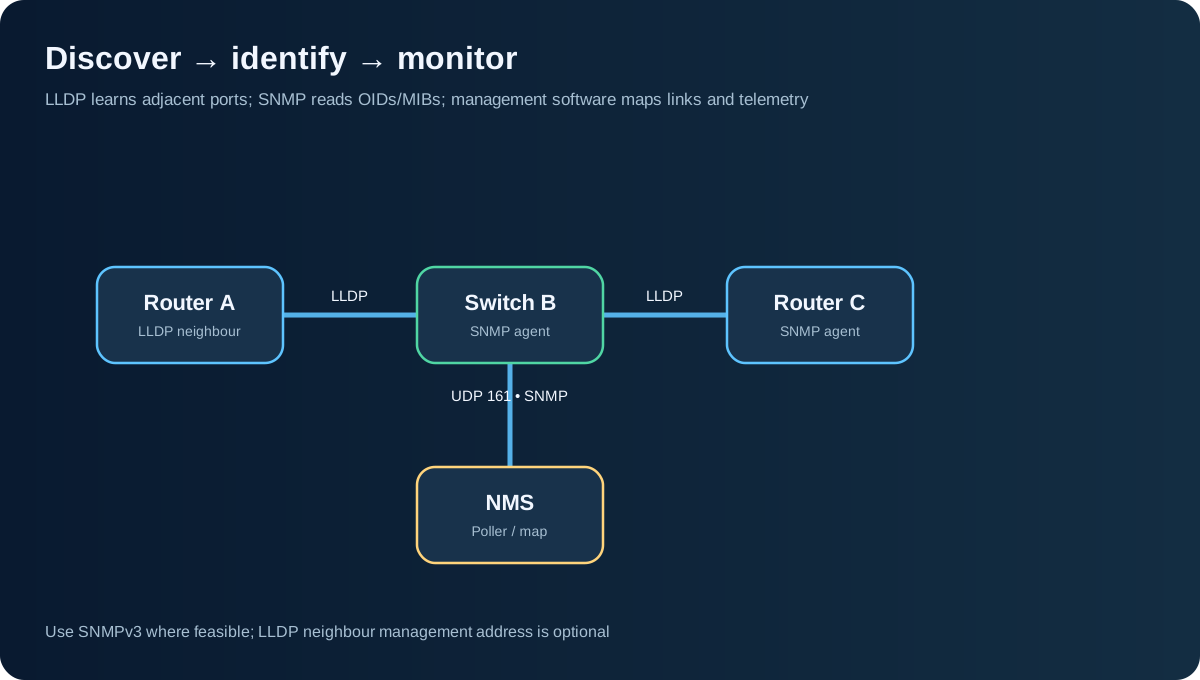
The three different roles
- LLDP (Link Layer Discovery Protocol) lets a device advertise identity and port information to directly adjacent network devices. CDP is a Cisco-specific alternative. LLDP is discovery information, not IP route exchange.
- SNMP (Simple Network Management Protocol) allows an authorised monitoring system to query and sometimes modify managed data exposed by a device’s SNMP agent. The monitoring system can poll interface status, counters and many other objects.
- MIB (Management Information Base) defines the structure and meaning of management objects. An OID (Object Identifier) is a hierarchical numeric identifier for an object. A MIB browser can decode numbers into meaningful symbolic names.
Think of it like this: LLDP describes a direct neighbour; SNMP reads device information; the NMS joins the observations into a topology and monitoring model. In practice, topology discovery tools may also use other methods such as CDP, address tables, routing data and ICMP.
My SNMP and MIB notebook
One small historical note says, “MIB — useful for SNMP things. MG-Soft MIB Browser for MIBs.” That statement became more practical after I worked with a Python SNMP test: read device software status/progress/version over SNMP, read the equivalent information from the device’s CLI and compare the two views. It matters because having an OID exposed is not enough—it should reflect the real operational state.
For a public demonstration, here are standard SNMP objects:
| Object | OID | What it tells me |
|---|---|---|
sysDescr.0 |
1.3.6.1.2.1.1.1.0 |
System description |
sysUpTime.0 |
1.3.6.1.2.1.1.3.0 |
Time since the management subsystem was initialised |
sysName.0 |
1.3.6.1.2.1.1.5.0 |
System name |
ifOperStatus |
under 1.3.6.1.2.1.2.2.1.8 |
Interface operational state by interface index |
SNMPv3 on a disposable lab device
# Replace placeholders with credentials from your own isolated test device
snmpget -v3 -l authPriv -u labuser -a SHA -A '<AUTH_PASS>' \
  -x AES -X '<PRIV_PASS>' 192.0.2.10 1.3.6.1.2.1.1.5.0

# With relevant Net-SNMP MIB packages loaded
snmptranslate -On SNMPv2-MIB::sysName.0
Use SNMPv3 authPriv where feasible, ideally with well-managed credentials and least-privilege views. SNMPv2c community strings are not encrypted and should not be sent over untrusted networks. Avoid putting secrets on a real shell command line where shell history and process inspection can expose them; use appropriate safer tooling and secret management.
LLDP: learning the next router or switch
On supported Cisco switches/routers:
show lldp neighbors
show lldp neighbors detail
show cdp neighbors detail
show interfaces description
An LLDP frame can provide chassis ID, port ID, device details and optionally a management address. It may not give a usable neighbour IP address, and even a reported address may be unreachable from my workstation.
The mental model is discover → validate → connect:
- Find the remote chassis/port through LLDP or CDP.
- Match it to interface counters, link state and expected cabling.
- Use an authorised, reachable management IP and approved credentials for SSH if remote administration is required. LLDP information alone is not permission to access another device.
How topology mapping software uses these pieces
Tools such as SolarWinds Network Topology Mapper can combine SNMP, LLDP, CDP and other discovery techniques to create and update maps. A nice-looking picture is useful, but the truthfulness of the links matters more than the artwork. I would verify an apparent connection against interfaces on both ends before relying on the topology in a failure investigation.
My practical NMS test method
This is the public concept adapted from my older SNMP automation, not copied code:
# Pseudocode for a public teaching example
snmp_name = read_snmp_oid(device, "1.3.6.1.2.1.1.5.0")
cli_name = read_authorised_cli(device, "show hostname")
assert normalise(snmp_name) == normalise(cli_name)
In actual code, use library timeouts, retries, good error messages and version-specific CLI handling. Test negative conditions too: inaccessible SNMP agent, revoked credentials, interface down and unknown OID.
Why this matters operationally
A useful NMS doesn’t just draw a topology. It helps answer: What is down? Where is the impact? Which other services depend on it? Are counters rising? Did an interface flap? SNMP and LLDP help build visibility, but trustworthy monitoring also needs change records, alert thresholds, clear ownership and operational response.
Shreyas Joshi
CCNA certified — Routing and Switching
References: SNMP architecture RFC 3411 · IF-MIB RFC 2863 · SolarWinds Network Topology Mapper